

Role and Permission for Team Members
There are three different roles of the team member that you can assign for better coordination and increased productivity.
Adding team members is easy with Replug.
Roles and permissions are mentioned below.
Administrator
Collaborator
Guest
Administrator:
The administrator can view all the platforms and also have a maximum right. They can add brands, campaigns, create branded short links, and integrate with the third-party service as well.
Collaborator:
A collaborator is one of the team members who can view those items which the administrator allows them in the platform. They have a minimum authority on the platform. They have no right to view team members until the owner allowed them.
Guest:
Guests are those team members or clients who have no editing rights to the platform until or unless the Owner allows them. They can view the brands, campaigns, links, and performance analytics only.
The table attached below shows the authority and rights of a team member in the platform. The actions of collaborators and guests can perform if the owner allowed them.
Role | Administrator | Collaborator | Guest | |
|---|---|---|---|---|
Can Add Brand | 
|
| 
| |
Can View Brand |
|
|
| |
Can Add Campaign |
|
|
| |
Can Add Custom Domains |
|
|
| |
Can Add Team members |
|
|
| |
Can View Team members |
|
|
| |
Can Create Tags |
|
|
| |
Integrate with 3rd party service |
|
|
| |
Can Add Retargeting pixel |
|
|
| |
Can Create Applications |
|
|
| |
Billing Page Access |
|
|
|
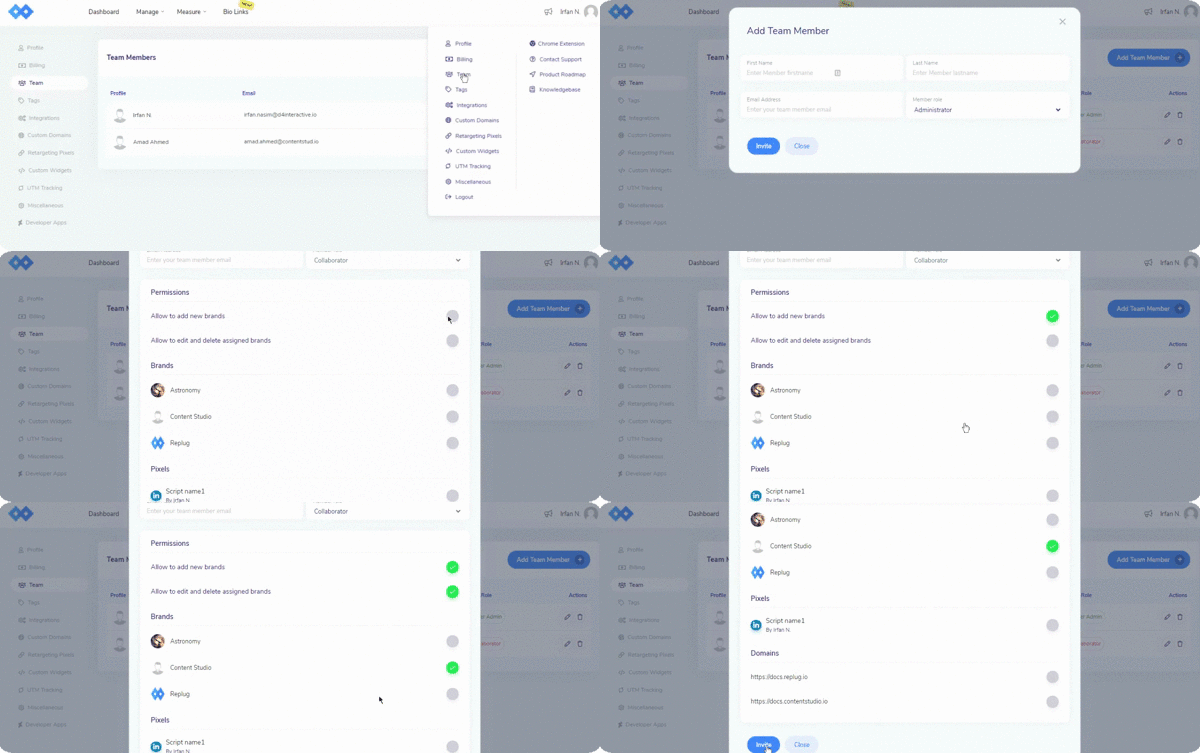
To assign roles and give permissions, follow this GIF
If you have any questions related to Replug, you can email us directly at support@replug.io or use the live chat on this page (also available on the dashboard at any time).
Was this article helpful?